
Register on PAK VIP Game the Right Way
Making an account here is quick. What most guides don’t tell you is that a few small choices during sign-up decide whether your first withdrawal goes through smoothly or gets stuck for days.
This page covers the whole thing — the form itself, the details that matter later, and what to sort out in your first five minutes.
What to Have Ready
Sort these out first and the form takes two minutes instead of twenty.
- A working Pakistani numberThe code comes here, and this number becomes your login
- Signal or Wi-FiThe SMS won’t arrive on a dead connection
- A password you’ll rememberAt least 8 characters, letters and numbers mixed
- Your CNIC name in mindType it exactly as printed — this one matters more than people realise
- An invite code, if someone gave you oneExtra bonus — but only works during sign-up
- To be 18 or olderNot a suggestion, it’s the rule
Three Things to Get Right Before You Type Anything
These aren’t formalities. Each one causes real problems for people who ignore them.
Your name must match your CNIC
Type your name exactly as it appears on your CNIC — same spelling, same order, no shortened version.
Why: when you withdraw later, the platform checks the name on your account against the name on your JazzCash or Easypaisa. If those two don’t line up, the payout gets held or refused — usually without a clear explanation. People assume the app is refusing to pay them. It isn’t. It’s a name check.
One account, and only one
One person, one account. Not one per SIM, not one per phone.
Opening extras to grab the joining bonus twice is the fastest way to lose the balance in all of them. Platforms like this check device and network patterns, and when they find duplicates they usually freeze everything rather than just the newest account.
Don’t sign up over a VPN
If you have a VPN running, turn it off before you register. Signing up from what looks like a foreign connection can get an account flagged straight away, and unpicking that later is far more trouble than it’s worth.
How to Register — The Full Process
On the app
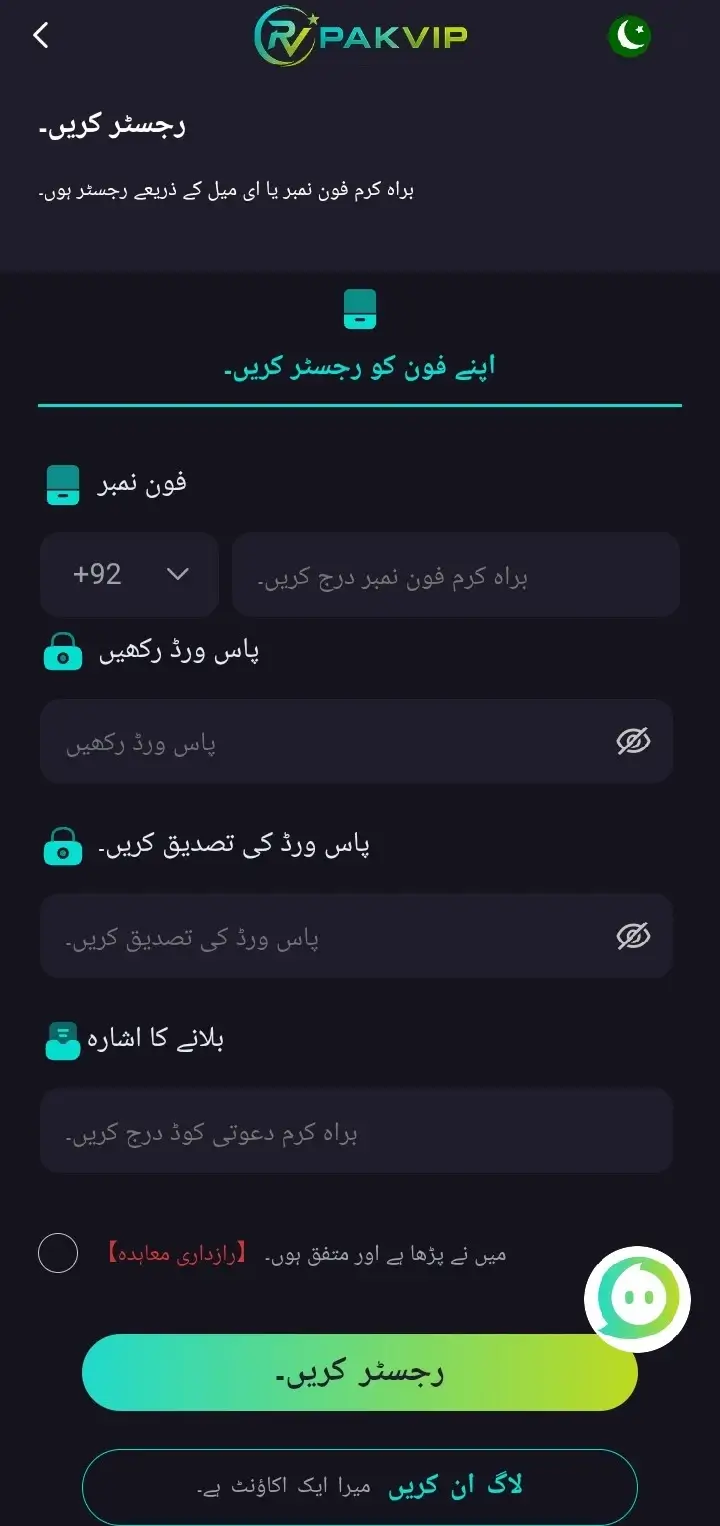
- Open the app and find Register or Sign Up — it sits near the top of the first screen.
- Put in your mobile number. Include +92 so the system reads it properly.
- Choose a password. Eight characters or more, with capitals, small letters and numbers in it. Don’t reuse the one from your email.
- Type the password again in the second box. Most failed sign-ups are just these two boxes not matching.
- Enter your invite code if a friend or agent sent you one. No code? Leave it blank — the form still works.
- Press Send OTP and wait for the SMS.
- Type in the six digits. Do it promptly — the code stops working after a short while and you’ll have to ask for another.
- Read the terms, tick the box, and press Register.
On the website instead
Don’t want the APK? The signup form on the website is identical. Open the official site in your browser, tap Register, and fill in the same details. The account you make there works in the app too — it’s one account either way.
What Happens Next
- You’re logged in automatically — no need to sign in separately the first time.
- Your joining bonus lands in the account, usually straight away. Check the promotions or wallet section.
- You can look around before spending anything. Browse the games, open the wallet, see how it’s laid out.
- The bonus will have conditions attached. Read them before you assume that money can be withdrawn.
Do These Five Things Straight Away
This is the part that separates a smooth experience from a frustrating one.
Set your withdrawal password
(if the app has one) A separate code from your login, needed every time money leaves. Set it while your balance is zero, not when you’re trying to cash out.
Link your JazzCash or Easypaisa number
Do it now, in settings. Use an account in your own name — a wallet in your brother’s name will fail the check later.
Turn on two-step verification
If the app offers it, switch it on. It means a stolen password alone isn’t enough to get into your account.
Get verification done early
Don’t wait until a withdrawal is sitting there. More on this below.
Test the whole cycle with small money
Put in the minimum. Play a little. Then take a small amount back out. That one test proves your details work while there’s almost nothing at stake.
Account Verification (KYC) — What It Is and When It Happens
Most people only meet this when a withdrawal stalls. Better to understand it now.
Verification confirms you are who you say you are. It exists to stop fraud, block underage accounts, and make sure winnings go to the right person. Every serious platform does it.
You usually won’t need it to register or play. It’s triggered by:
- A larger withdrawal than usual.
- Anything the system flags as unusual on the account.
- A routine check on accounts that have been active a while.
- Your CNIC — a clear photo of the front and back.
- A selfie, sometimes, holding the CNIC.
- Proof of address in some cases — a utility bill or bank statement, and it should be recent, not one from two years ago.
- Take the photos in good light. Blurry or dark images get sent back, and that’s the main cause of delays.
- Show the full card — all four corners in frame, nothing cut off.
- Don’t crop or edit anything.
- Make sure the name on the CNIC matches the name on your account and your wallet. All three, the same.
The Invitation Code Explained
- It’s optional. You can register perfectly well without one.
- It usually adds a bonus for you, and pays the person who gave it to you.
- It only goes in during sign-up. There’s no adding it afterwards, so if you have one, use it now.
- Codes expire. If yours gets rejected, just clear the box and carry on — it won’t stop your registration.
- Once you’re in, you get your own code to share, and that’s how the agent programme starts.
Registration Problems and How to Fix Them
📵 The OTP never came
🔁 “This number is already registered”
🔑 It keeps rejecting the password
📄 The form won’t load
🎟️ The invite code isn’t accepted
📱 The app crashes during sign-up
🚫 Registration completes but the account looks restricted
Mistakes That Cause Problems Later
Every one of these is easy to avoid on day one and painful to fix on day thirty.
The single most common reason withdrawals get blocked.
Your account name, your CNIC and your wallet name all need to be the same person.
Risks everything in the first one.
Your number is your login and your recovery route. A dead SIM can mean a lost account, so don’t register on one you’re switching away from.
Bonuses come with play-through conditions. Read them before you count that money as yours.
No real support agent will ever ask. Anyone who does is trying to take your account.
Rules Worth Knowing Upfront
- 📌 18 and over only. Underage accounts get closed and balances forfeited.
- 📌 One account per person. Per person — not per SIM or per device.
- 📌 Real details only. Whatever you enter should match your documents, because eventually it gets checked.
- 📌 Keep your registered number. It’s your login, your OTP route and your way back in if you’re locked out.
- 📌 Your account is yours alone. Don’t let anyone else play on it or handle your withdrawals.
Keeping the Account Secure
If your email password leaks somewhere, you don’t want it opening this too.
Support won’t ask. Friends don’t need it. Nobody legitimate wants it.
Takes a minute to set up and stops most account theft outright.
Especially around deposits and withdrawals. Mobile data is safer.
Every time, without exception.
If a login or a transaction looks unfamiliar, change your password immediately and message support.
Set Your Limits Before You Play
The app has controls built in, and hardly anyone mentions them. Find them in your account settings:
- Deposit limits — cap how much you can put in over a day, week or month.
- Self-exclusion — block your own account for a period you choose.
- Session reminders, on some platforms — a nudge showing how long you’ve been playing.
Where This Stands in Pakistan
Worth two minutes before you deposit anything.
- Online real-money gaming sits in a grey area here. No Pakistani authority licenses platforms like this.
- The Prevention of Gambling Ordinance 1977 and PTA advisories both caution against unregulated platforms.
- It isn’t on Google Play because the Play Store bans real-money gaming apps — that’s policy, not proof either way.
- There’s no regulator to complain to. If something goes wrong, support is where it ends.
- Any site telling you this is “fully legal in Pakistan” is wrong. A genuine licence names the body that issued it.
Before You Deposit
Signing up is free. What follows isn’t.
Registration Questions
Does it cost anything to register?
How long does it take?
Do I need a CNIC to sign up?
Can I register without a Pakistani number?
Can I make more than one account?
What if my OTP doesn’t come?
I forgot my password right after registering — now what?
Is the invite code compulsory?
Can I add an invite code later?
When will I need to verify my identity?
Can I change my registered number afterwards?
Can I sign up on the website instead of the app?
👤 Ready to Sign Up?
Free to register, takes about two minutes. Use your CNIC name, keep it to one account, and set your limits before you deposit.